Python
presented by Sbincer Chuang

# CHAPTER 0
Presenter
莊貴淳
- 現為 NTUIM 升大一
- 曾任 CKCSC 公關兼教學
- 曾教學網頁、Figma、Notion
課程規劃
事前準備
在開始寫 Python 前,認識會用到的工具與觀念建構,並初步認識 Python 能做到的事以及定位
1.
2.
Python 語法
開始寫 Python!
了解基本的語法、資料結構、迴圈等寫法,為後期的高階應用打下紮實基礎
3.
Python 應用
對基本語法熟識後,使用 Python 撰寫小應用,將 Python 與現實生活接軌,以利未來解決現實問題
# CHAPTER 0
何謂程式?
# Prerequisite knowledge


程式不同的功能
# Prerequisite knowledge
數據分析
操作資料庫
應用軟體開發
網頁互動
# Prerequisite knowledge
數據分析
操作資料庫
應用軟體開發
網頁互動
程式不同的功能
R語言
SQL
C語言
JavaScript
# Prerequisite knowledge
Python 的功能
網路工具程式開發
數值分析
影像辨識
人工智慧
# Prerequisite knowledge
如何與電腦溝通

機械碼
# Prerequisite knowledge
如何與電腦溝通
機械碼
低階語言
程式語言
高階語言
# Prerequisite knowledge
如何與電腦溝通
機械碼
低階語言
程式語言
高階語言
組合語言
# Prerequisite knowledge
如何與電腦溝通
機械碼
低階語言
程式語言
高階語言
組合語言
Assembly
# Prerequisite knowledge
如何與電腦溝通
機械碼
低階語言
程式語言
高階語言
組合語言
ADD
MOV
Assembly
# Prerequisite knowledge
如何與電腦溝通
低階語言
高階語言
轉 譯
直譯
編譯
# Prerequisite knowledge
如何與電腦溝通
低階語言
高階語言
直譯
編譯
# Prerequisite knowledge
直譯
編譯


compile
interpret
# Prerequisite knowledge
直譯
編譯
C++
Python
執行效率快
較不易理解
執行效率差
適合初學者
# Prerequisite knowledge
直譯
編譯
C++
Python
#include <iostream>
using namespace std;

int main() {
    cout << "Hello! World!\n";

    return 0;
}
print("Hello World!")# Install Python
What version are we using?
Python 2
Python 3
2020
# Install Python
What version are we using?
Python 2
Python 3
2020
我們可以在終端機輸入
python --version
python -V
# 二則一
來確認版本
# Install Python
下載 python
# Recognizing Terminal
認識文字命令操作介面
# Recognizing Terminal
認識文字命令操作介面
操作電腦
文字
圖形
雙擊 Chrome 圖示
explorer "https://google.com.tw"
簡單易理解
迅速高效
很酷、很專業
全英文、背指令
GUI
CLI
# Installing IDE
安裝整合開發環境
寫程式的地方
# Installing IDE
文字編輯器
Word
# Installing IDE
整合不同的開發工具
# Installing IDE
整合開發環境(IDE)
# Installing IDE

# Installing IDE
Visual
Studio
Code
# Installing IDE
V
S
Code
# Installing IDE

# Installing IDE

# Installing IDE

# Installing IDE

# Installing IDE
在桌面新增資料夾
# Installing IDE
打開 VS code
# Installing IDE

# Installing IDE

# Installing IDE

# Installing IDE

# Installing IDE
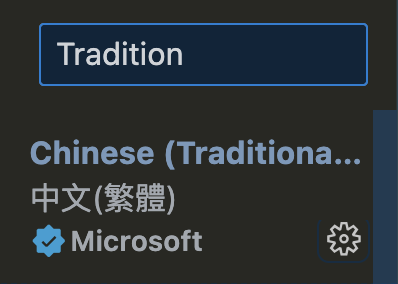
下載協助開發的工具
# Installing IDE

# Installing IDE

# Installing IDE
# Installing IDE

# Installing IDE
# Making first project
製作第一個專案
# Making first project
先來學學怎麼執行python吧
print("hello world!")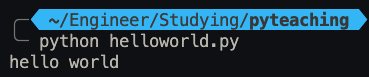
# Making first project
製作問答測驗程式
蘋果的英文是什麼?
{answer}
apple
banana
right!
wrong.
# Making first project
製作問答測驗程式
{answer}
變數


# Making first project
製作問答測驗程式
print("")
在終端機顯示文字
讀取用戶在終端機輸入的文字
input()
接收並顯示使用者的輸入文字
# Making first project
製作問答測驗程式
蘋果的英文是什麼?
{answer}
apple
banana
right!
wrong.
# Making first project
製作問答測驗程式
input()'apple'
answer
# Making first project
製作問答測驗程式
input()'apple'
answer
answer = input()# Making first project
製作問答測驗程式
print('蘋果的英文是什麼?', end=' ')print('蘋果的英文是什麼?')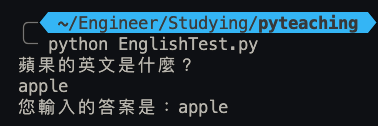
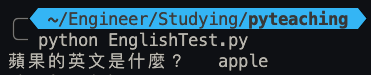
# Making first project
變數的命名規則
- 只能包含
- 字母
- 數字
- 底線(_)
- 不能用數字開頭
- 大小寫有別
- diy
- DIY
- 使用有意義的文字
- 避免關鍵字(keyword)
# Making first project
怎麼知道哪些是關鍵字
print(keyword.kwlist)print(keyword.iskeyword('for'))# Making first project
命名原則
PEP8
駝峰原則
name_list
nameList
以底線分隔單字
第二字需大寫
# if-else
條件判斷
# if-else
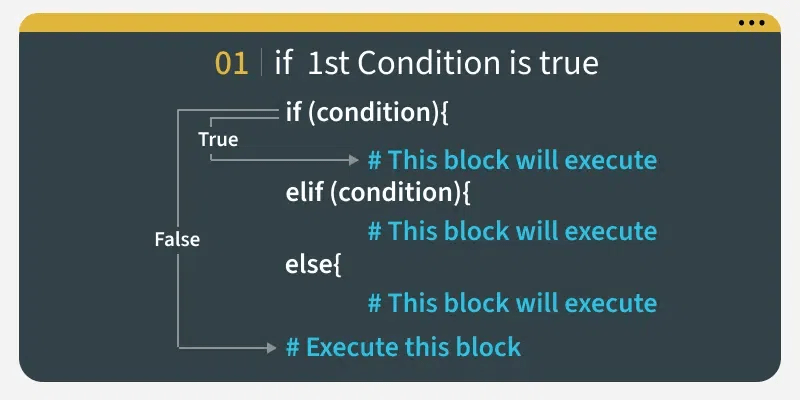
If 條件式
# if-else
# if-else
if ans == 'apple':
    print("that's right!")
else:
    print("damn bro.")
# if-else
if ans == 'apple':
    print("that's right!")
else:
    print("damn bro.")
'apple'
'banana'
# if-else
if ans == 'apple':
    print("that's right!")
else:
    print("damn bro.")
'apple'
'banana'
# if-else
# if-else
# if-else
要是用戶輸入 'APPLE' 或 'Apple' 怎麼辦?
# if-else
要是用戶輸入 'APPLE' 或 'Apple' 怎麼辦?
if ans == 'apple':
    print("that's right!")
else:
    print("damn bro.")
# if-else
要是用戶輸入 'APPLE' 或 'Apple' 怎麼辦?
if ans == 'apple':
    print("that's right!")
elif ans == 'APPLE':
  	print("that's right!")
elif ans == 'Apple':
  	print("that's right!")
else:
    print("damn bro.")
# if-else
要是用戶輸入 'APPLE' 或 'Apple' 怎麼辦?
if (ans == 'apple') ||(ans == 'APPLE')||(ans == 'Apple'):
    print("that's right!")
else:
    print("damn bro.")
# comment
為程式加上註解
# comment
'''
多行註解使用三個單引號或雙引號包裹起來
'''

# 單行註解用井字號開頭

ans = input() #也可以加在程式碼的後面
# Data Type
資料型別
# Data Type
收藏箱
醫療箱
武器箱
# Data Type
int
float
bool
str
整數
浮點數
布林值
字串
chr
字元
integer
floating-point
boolean
string
chraracter
# Data Type
int
float
bool
str
整數
浮點數
布林值
字串
chr
字元
x=1
x=3.14
x=True
ans = 'apple'
'a', 'p'
# Data Type
list
tuple
dict
set
列表
tuple
dict
set
# while-loop
while 迴圈
# while-loop


10
# while-loop
10
<=10?
放人
>10
不放人
# while-loop
<=10?
放人
>10
不放人
if people <= 10:
	people++
只能判斷一次
重複作業
# while-loop
<=10?
放人
>10
不放人
while people<10:
    people ++
重複作業